
April 27th, 2017
LumaBooth Update v1.4.1
Browse previous prints and GIFs from the start screen
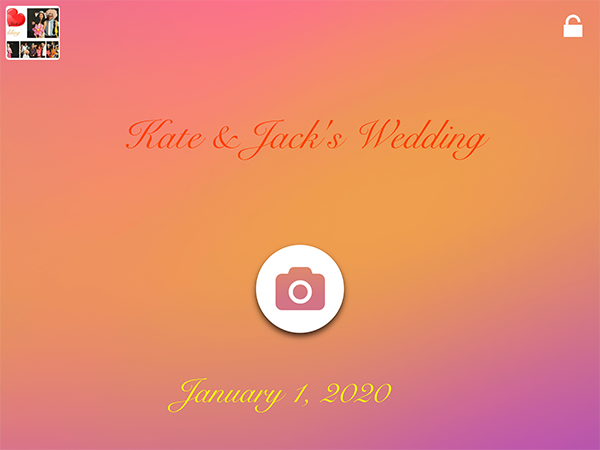
Previously taken photos and gifs will now appear in the upper left hand corner of the screen. Guests can click on the photos to share them.
Edit Start Screen
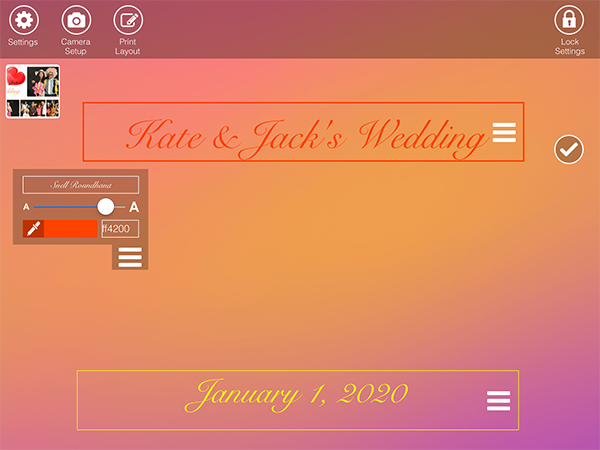
Have more control over the look of your start screen. Click on the checkmark to edit the color, font and size of your text. Move the text to your desired place on the screen.
Improved template editor when working with transparent images
Transparent images now allow you to click on photos and text behind them, allowing for no interference with the images.
Fix for MP4 orientation correction when iPad is upside down
Mp4s and GIFs will now appear right side up when iPad is upside down.
Related Articles
Printing Alert: Hold Off on iOS 27 for Your LumaBooth iPad
September 22, 2026
iOS 27.0 has a bug that stops AirPrint after the first print. Apple has been notified. Here’s ...
Read More
Your Prints, Your Sizes: Pick Any Print Size Over USB in LumaBooth 5.4.2
September 3, 2026
LumaBooth 5.4.2 lets you pick the exact print size for the paper in your DNP, Citizen, or HiTi print...
Read More
Mirror It, Flip It, Print It: What’s New in LumaBooth 5.4
August 11, 2026
LumaBooth 5.4 for iPad, iPhone, and Mac adds mirror and flip for captures, Mac keyboard shortcuts, C...
Read More